Screenshots: Connecting to CS Servers via SSH
A visual guide demonstrating how to connect to the UMass Boston CS servers using SSH from PowerShell.
Step 1: Open PowerShell and Enter the SSH Command
Open PowerShell on your Windows machine and type the SSH command to connect to the CS server:

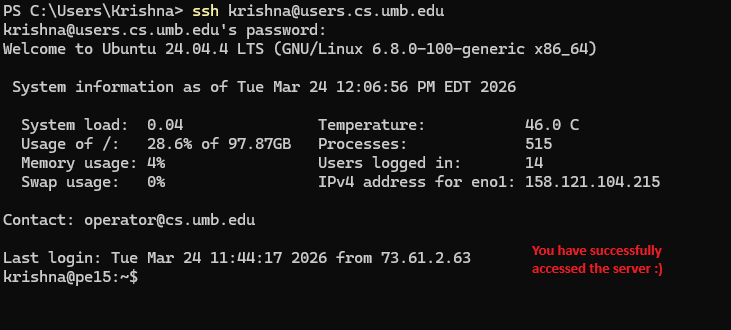
Step 2: Successful Login
After entering your password, you will see the server welcome message with system information:

Step 3: Server Terminal
You are now connected and ready to use the CS server:
Basic Server Commands
Once you are logged into the CS server, here are some essential commands to get started:
pwd - Print Working Directory
Shows your current location in the file system:
krishna@pe15:~$ pwd
/home/krishna
ls - List Files and Directories
Displays the files and folders in your current directory:
krishna@pe15:~$ ls
cs110  cs210  cs310  cs410  public_html
whoami - Display Current User
Shows the username you are logged in as:
krishna@pe15:~$ whoami
krishna
cd - Change Directory
Navigate to a different folder:
krishna@pe15:~$ cd cs410
krishna@pe15:~/cs410$
cat - View File Contents
Display the contents of a text file:
krishna@pe15:~/cs410$ cat R18.txt
Krishna Kanodia
R18
...
mkdir - Create a New Directory
Create a new folder in your current location:
krishna@pe15:~$ mkdir myproject
krishna@pe15:~$ ls
cs110  cs210  cs310  cs410  myproject  public_html
Quick Reference: Command Cheat Sheet
A handy reference table of all the essential commands covered in this tutorial:
| Command | Description | Example |
|---|---|---|
pwd |
Print current working directory | pwd → /home/krishna |
ls |
List files and directories | ls → cs110 cs210 cs410 |
whoami |
Display current username | whoami → krishna |
cd |
Change directory | cd cs410 |
cat |
View contents of a file | cat R18.txt |
mkdir |
Create a new directory | mkdir myproject |
ssh |
Connect to a remote server | ssh krishna@users.cs.umb.edu |
scp |
Copy files to/from server | scp file.txt krishna@users.cs.umb.edu:~/ |
chmod |
Change file permissions | chmod 755 file.pdf |
rm |
Remove a file | rm oldfile.txt |
Troubleshooting Common SSH Errors
Here are some common errors you might encounter when connecting to the CS server and how to fix them:
Error: "Connection refused"
Problem: The server is not accepting SSH connections or is down for maintenance.
Solution:
- Check if you typed the server address correctly:
users.cs.umb.edu - Verify your internet connection is working
- Wait a few minutes and try again - the server might be temporarily down
- Contact the CS department if the problem persists
Error: "Permission denied (publickey,password)"
Problem: Your username or password is incorrect.
Solution:
- Double-check your username - it should be your CS server username, not your UMB email
- Make sure CAPS LOCK is off when typing your password
- Try resetting your password through the CS department
- Verify you're using the correct format:
ssh username@users.cs.umb.edu
Error: "Host key verification failed"
Problem: The server's security key has changed or there's a potential security risk.
Solution:
- This usually happens after server maintenance or upgrades
- Remove the old key from your known_hosts file:
- Windows:
ssh-keygen -R users.cs.umb.edu - Then try connecting again and type "yes" when prompted to accept the new key
Error: "ssh: command not found"
Problem: SSH is not installed on your computer or not in your system path.
Solution:
Error: "Connection timed out"
Problem: Your network is blocking the SSH connection or the server is unreachable.
Solution:
- Check your firewall settings - some networks block SSH (port 22)
- Try from a different network (home, campus WiFi, mobile hotspot)
- If on campus, make sure you're connected to the UMB network
- VPN connections can sometimes interfere - try disconnecting VPN
Still having issues? Contact the CS department help desk or email cs-support@umb.edu for assistance.